Sunday, 6 September 2015

Maven : Unmavenized Artifacts in Multi Module Environment

Maven's declarative behavior forces user to use managed artifacts and discourages the use of unmanaged/external/unmavenized artifacts/jars.

There are couple of workarounds to solve this problem. Some of the hacks have been described below.

Method 1 : Using 'system' scope
Maven provides scope called 'system' which expects absolute path. But using absolute path will makes build user specific which should not happen in automation tools. This can be avoided using ${basedir} variable. This variable provides the absolute path of current module and hence jar put in relative with the current module can be relatively accessed with ${basedir} variable.
  • Create a folder(say lib) and keep external jars into lib folder. 
  • These jars can be accessed as shown below. 
  <dependency>
        <groupId>com.bala</groupId>
        <artifactId>test-artifact</artifactId>
        <version>1.0</version>
        <scope>system</scope>
        <systemPath>${basedir}/lib/test-artifact.jar</systemPath>
    </dependency>
Pros : Easy to implement
Cons : In case of modularized project, if same jar is being used in multiple modules, this jar should be duplicated in all those modules. (You may get a thought that why can't we keep it in parent pom, but child modules cannot access parent's absolute path. Maven 3+ doesn't support accessing parent's properties from child module.)

Method 2 : Using file based repository
  • Create a local repo(say lib and commit this lib along with the external jars, if you use version control). 
  • Identify all the external jars and install them using following command. 
mvn install:install-file -Dfile=<path-to-file> -DgroupId=<custom-group-id> -DartifactId=<custom-artifact-id> -Dversion=<custom-version> -DlocalRepositoryPath=<path-to-local-repo-folder>
  • Specify file based local repository in your pom as shown below. 
<repositories>
    <repository>
        <id>custom-repo-id</id>
        <name>custom-repo-name</name>
        <url>file:${basedir}/lib</url>
    </repository>
</repositories>
  • Now external dependencies can be used with the help of minimal pom in dependencies section. 
<dependency>
    <groupId>custom-group-id</groupId>
    <artifactId>custom-artifact-id</artifactId>
    <version>custom-version</version>
</dependency>
Pros : Better than using system scope.
Cons : In case of modularized project, if same jar is being used in multiple modules, this jar should be installed in all modules' repo. (You may get a thought that why can't we keep it in parent pom, but child modules cannot access parent's absolute path. Maven 3+ doesn't support accessing parent's properties from child module.). Moreover this method adds unnecessary files and commits to version control's repository which is not desirable.

Method 3(Recommended):
Method 2 can be enhanced by applying a bit of intelligence using maven plugin capability. In the preceding method, external jar is being installed into file based repo which is going to be existed in version conrol's repo. Instead, if you can install jar into user's local repository as soon as user ran clean or compile then it will automatically be installed into user's local repository. Now this can be accessed using minimal pom. I advice to go by following steps.
  • Create a folder(say lib) in the current project and keep all the jars into that folder. In case of modularized project, create a module, say external-jar-installer and copy lib folder along with the jars into the module. Make sure that these jars should be checked in. 
  • Now use maven maven install plugin and configure all the jars in clean phase as shown below. 

  • As soon as we run mvn clean, all the jars will be fetched from lib folder and be installed into user's local repo. Hence minmal pom will becom valid for the user whoever is executing rest of the the mvn commands.

Pros : This will be a cleaner way, even in case of modularized project. Dedicatedly one module can be allocated to install these jars and plugin. Rest of the modules will be ignorant of external jars and they will just use them as if they were fetched from repository.

Monday, 18 May 2015

How to delete a file in Windows with a long filename

Windows has a restriction on length of the filename. But sometimes, you may end-up with files which are having larger than 250 characters and windows will not allow us to delete them. 
Windows 7 has come up with a tool called robocopy. We can delete long named files with the help of this tool. 

Robocopy has an option called mirror copy which will create a mirror of source in destination folder. 
  • Create an empty folder. 
  • robocopy empty_folder long_named_directory /s /mir
  • Now it will create mirror of empty folder in destination folder leaving bot the folders empty. 
  • You can happily delete both of them. 

Monday, 30 March 2015

Maven : Creating jar with dependencies

While working with the maven, it is a case that all the dependent jars will not be packed into the jar, whereas in case of war, all the dependent jars wil be packed into web/lib folder. If you want to create a simple jar with all its dependency jars then you need to create uber jar.(Uber means Super, extreme or outstanding). Here are the steps to create uber jar using maven.


  • Step 1 : Create an assembly xml and put it into your resources folder.
  • Step 2 : Include assembly.xml in your pom in the plugin-configuration node along with the manifest-mainclass.
  • Step 3 : Fire mvn assembly:assembly, it will create simple and uber jar in your target folder. 

Sunday, 25 January 2015

ExtJS5 - Codemirror Integration

Being one of the leading frameworks for RIA, I was expecting ExtJS 5 with an inbuilt code editor. There are some add-ons available for ExtJS3 and ExtJS4 by extending form field base so that they can make it in par with form. But it is more restricted using in that way. We need to compromise with the layout if you are not using it on any other component. Instead we can use a simple hack to make it work seamlessly on any ExtJS components.

Since code mirror requires div or textarea, we can make use of ExtJS' 'box' to get handle of div. Next level complexity comes with form support and layouting. Here is the idea

  • Create a custom component by extending container of panel(As per requirement)
  • Use codemirror's configs as configs of custom component
  • Add following components as items
    • box : Since it provides a div, we can use it to render code mirror component
    • field: Add this item to your custom component and make it hidden. Replicate all the changes/actions on this field component whenever there are changes/actions on the codemirror. 
  • Initialize codemiror field 'afterrender' of custom component with the configs that are defined on it. 
Form Support
ExtJS form comes with the additional properties like dirty change, load/get/update Record features  so that we can load the model into the form and work with it. Whenever we add our custom component to form, form will be able to identify the field item which is the part of our custom component. Since ExtJS form fires every action on our field, we can get the handle form actions. 

For example if there is a change event on code mirror, we will be able to find out whether its a dirty or not but how can we tell form that it is dirty? Thats where we bring our field into action. Call setDirty function of field and fire dirty change event from that. Rest will be taken care by form. Sam e applies with the other actions. 

Layout Support
Since it is our custom component, we don't need to worry much. 

Controlling Size
Code mirror has a pre-configured height(300) in its css and there is a method to set custom height and width. We can pass these values as configs to our custom component and call setSize method of codemirror. 


I have tried a custom component with remote validation features. You can find source code at the following location. This is just a prototype code to show how we can make codemirror work with ExtJS without affecting much from its version changes. You can take the idea and customize it as per your needs. 


Tuesday, 20 January 2015

Selection of Div Content on ExtJS(Select ALL)

Here is a simple code snippet to show data on view with select all enabled container.


Sunday, 11 January 2015

Workaround : Ext JS 5.1.0 checkboxmodel 'deselect' defect

ExtJS 5.1.0 is having a bug in checkboxmodel. While using checkbox model, it is not firing deselect/selection change when the model is 'MULTI' which is a default value.

Use following snippet to make it work.

 selModel: {
          selType: 'checkboxmodel' 
          model : 'SIMPLE'

}

Thursday, 1 January 2015

model Deletion in ExtJS 5

While I was working with ExtJS 5, I faced a problem in deleting a record. 'erase' is a method in ExtJS 5 to delete a model, which is a counter part of 'destroy' method in ExtJS 4. I tried 'erase' method on model to delete it using rest and it was not sending any DELETE request to the server. Here is the sample code snippet
var user = Ext.create('User', {
   extend : 'Ext.data.Model',
   fields : ['id', 'name', 'email'],

   proxy : {
    type : 'rest',
    url : '/users'
   }
  });

user.set('id', '12345');
user.erase();

In the preceding function call, will not be any XHR request with 'DELETE' method as we expect, if you are using ExtJS-5.1.0. In ExtJS 4, if there is any change in the ID property, it calls a function(changeId) that does house keeping of a model hence, model's phantom becomes false whereas in ExtJS5, user.set('id','12345') will not change user's phantom to false(When we create model using Ext.create, default phantom value will be true). Since it is a phantom record(new record), it will not call any 'DELETE' request.

Here is a simple hack to handle this problem. We hope there will be a fix in their future releases.

user.set('id','12345');
user.commit(); // user.phantom becomes false
user.erase();
or
user.set('id','12345');
user.phantom = false; //Make phantom as false manually
user.erase();

Saturday, 13 September 2014

Spring MVC Test cases with Annotated Beans Using Mockito

Annotations make java developer's life easy and also it feels like annotation based classes are complex for unit testing. But in reality it is quite simple. There are couple of ways through which you can test autowired/spring based classes.

Method 1:
You can use AnnotationConfigApplicationContext to load application context. Instantiate application context, register annotated classes and test your methods. Here is the sample code

Method 2:
Even though preceding method is an easiest way to test annotation based spring classes, if your test case becomes complex and if you want to mock actual request etc, you better move to mocking framework instead of basic one. I have used mockito with spring-test to mock actual requests with spring beans. Here is the sample code

In the above sample code we have used spy to mock real objects, if you just want to mock it you can use mock annotation instead of spy.

For this you need mockito and spring-test jars. Following are the minimal poms for the both respectively.
     <dependency>
            <groupId>org.mockito</groupId>
            <artifactId>mockito-core</artifactId>
            <version>1.9.5</version>
            <scope>test</scope>
  </dependency>
            <dependency>
           <groupId>org.springframework</groupId>
            <artifactId>spring-test</artifactId>
            <version>4.0.0.RELEASE</version>
          <scope>test</scope>
  </dependency>

Here is the complete code with both the testing methodologies.
spring-test-template using mockito

Wednesday, 10 September 2014

Extjs 4 : Delegating Events

Though ExtJS supports excellent event handling mechanism, sometimes we may want to handle custom events on some HTML components. For example if you want to handle hyperlink click whereas hyperlink is embedded in html code(using html tag or xtemplate), then you may need to delegate events to the component that you have created using 'delegate'. You can use simple hack to handle this.

  • Create HTML text using html tag or xtemplate. 
  • Assign classname/id to the component to which you want to attach an event. 
  • Attache event to the Ext body and delegate to the specific class/id show in below.
  • Make sure that class name or id is unique. 

Here is the fiddle to fiddle around with it.
Sample snippet

Friday, 29 August 2014

ExtJS4 Dynamic Grid

In the MV* patterns, model refers to the fixed state of content. If state changes then the benefit that comes out of this model is trivial. Some times it could be a case that model is dynamic, in such a case ExtJS grid should be constructed dynamically. Here is how the sample code goes...

ExtJS4 grid has a method called reconfigure which takes store and columns as input arguments and restructures grid. These columns and store depends on the field data which a part of model. Since model is dynamic lets create field data dynamically along with the actual data and send it to the server.


Here is the structure from server

Thursday, 21 August 2014

ExtJS4: Missing HasOneInstance While Decoding JSON

Sometime ExtJS plays dumb role in throwing exceptions. It ignores exceptions instead of handling them, especially while dealing with associations. 

Whenever ExtJs loads data throw proxy into model, it decodes json data into respective models including associations. In case of hasMany association it creates <association-name>Store and in case of hasOne association, it creates <association-name>HasOneInstance store and decodes data into corresponding stores. 

But here are some cases where ExtJS may miss these conversions without throwing any error. 
  • If your association name is in camel case and if you have defined its association with its basic properties like type and model, then ExtJs generates rest of the properties by default. While generating default properties it converts camel case text into lower case and associate it to the association. 
   For example if you have defined a hasOne association as follows, 
       associations: [{ type: 'hasOne', model: 'homeAddress' }]
  It generates association_key as homeaddress (converts camel case into lower case) and maps this key      with the json object which will be in camel case. Because of mismatch in name, it doesn't create homeAddressHasOneInstance object in the parent object. 
  • If you don't use association's model explicitly and miss its inclusion in controller then ExtJS doesn't complain about the model and store conversion will not happen for that association. 

Saturday, 16 August 2014

Logging in Eclipse Birt

Birt is one of the best open source projects that provides data visualization and reports for rich internet applications. But logging is one of the common problems while developing reports in BIRT report engine. Here is the small hack that I have used in birt global script to log my data.
  • Select initialize Script in birt(Select report, open report in Birt Report Design perspective select report and go to script tag, on the top of the screen, you can select initialize script). 
  • Since Birt uses java logging, you can use following script in initialize script to log the message
  • 


    importPackage(Packages.java.lang); function log(msg){ System.out.println("Info : " + msg); } reportContext.setGlobalVariable("log", log)
    
    
  • Use log function in other scripts to log message. 
Note : If you cant find the console in eclipse, open eclipse in console mode. (To open eclipse in console mode, open eclipsec.exe instead of eclipse.exe). 

You can also use Log4j properties in birt reporting. Here is the detailed explanation.   

Wednesday, 13 August 2014

Eclipse : Server Error - Resource **** Does Exist

Today I was trying to configure my development environment in newly released Eclipse version: LUNA. Suddenly I faced a  problem in configuring server. I was just using simple tomcat which I had used it like hundred times. Only change I did was to modify small entry in some configuration file and then eclipse started crying. I tried many combinations, changed different tomcat servers and to test the tomcat server I moved into older eclipse. Finally I found that its a bug in eclipse. Its not with the new eclipse version but there with every eclipse version.

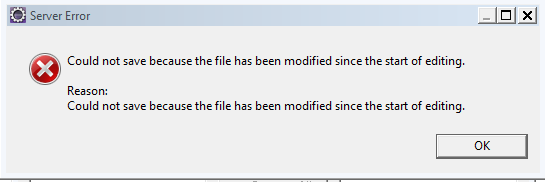
Here is the error...
Reason:
Could not save because file has been modified since the start of editing eclipse


Here is the solution to my problem. Its the name that has caused the problem. While naming the server I have used server location as the name of the server.

I used server name as 'C:\NGPS\apache-tomcat-7.0.27'  and because of the back slashes in the name, it was failing to add new server. Moreover message that was throwing matched in my case and I ended up in doing permutations and combinations. Simple workaround for this problem is to change tomcat name to a simple string with alpha-numerics. Once you change the name, close 'Add new server window' and try to add it agian.

Wednesday, 2 July 2014

ExtJS4 : Copying data from one grid to another.

Copying content into clipboard is a security hole. As a result no simple javascript method is available to write content into clipboard. Except IE, no other browser supports this without any plugins/flash. But if you just want to copy one row of grid and paste it into another grid you can use following hack.(Two grid stores should use same model). 

  • Select a row and provice ExtJS context menu, in action get selected record. It will be in the form of model. Convert this model object into JSON object using getData(true) method on the model. It converts model object into json including association data. 
  • Now your task is to persist this data in user's environment. For this you can use HTML5 web storage. It is simple, faster and secure. But it doesn't work on IE7 and earlier versions.
                   localStorage.setItem("json-object", model.getData(true));
  • Above code stores model object into client's browser in the form of string. 
  • When you wan to handle paste, fetch the stored data string and decode into JSON object. 
                  var jsonObject =  Ext.Deode(localStorage.getItem("json-object"));
  • After retrieving jsonObject convert this back in to model and push it into grid's store. 
            Check this to convert jsonObject into model.


Extjs4 : Converting JSON Object into model

ExtJS provides getData(true) method on model to convert model object into JSON Object including associations. But other way is not a straight forward thing in ExtJS4. If you have JSON and want to convert into model, one dirty way could be create a store with memory proxy, input JSON object as data object and access first record in the store. But this method is not always fruitful. If your JSON has associated data, this method will not work properly. Especially in case of hasOne association case, it never creates *HasOneInstance objects using this method.

I found similar API in Sencha touch 2.2.1 and modified a bit to make it work in ExtJS 4.2.1

Thursday, 12 June 2014

MxGraph Indicator Diagram

Recently I have used mxGraph to draw an indicator diagram to indicate active panel in a wizard. Event though mxGraph has a documentation, I found it difficult while working with this framework.

By default mxCell allows one lable per cell. If you need more than that we can insert labels using insertCell or insertVertex. In this example I needed two lables(One for state and other is for name of the state), so I have used vertex and inserted one more vertex to the parent vertex. 


Source can also be found @ https://github.com/Balagangadhar/ExtJS4-Misc/blob/master/Indicator.js

Tuesday, 18 March 2014

Extjs 4 : Converting treestore into store using associations.

Extjs doesn't support updating tree by keeping nodes in its own hierarchy. treestore.sync90 function only sends updated nodes to the server as individual models. But sometimes we may need to send tree structure in the form of tree to the server(Ofcourse only updated nodes).

For example consider following tree,
Parent1
  • Child1
  • Child2
  • Child3
Parent2
  • Chld4
  • Child5
 If  child2 and child5 are dirty records and if we fire treestore.sync(), it only sends child2 and child5 models as data. We loose the context of parent. We may not know for which parent this child belongs to. In such a case you can use following model and code snippet to convert your tree into model with associated models.

Each node will have subtree models as associated model and using following function, you can convert modified tree nodes into associated-model store. This store is a plain store with associated models. Now you can send this model to the server
(For more info on sending updated model associations to the server viz following blog post
http://balu-learnings.blogspot.in/2014/03/extjs-4-sending-updated-models-to.html ).

model :

Ext.define('App.model.treegridsample', {
    extend : 'Ext.data.Model',
    fields : [ {
        name : 'id',
        useNull : true,
        defaultValue : ''
    }{
        name : 'text'
    }{
        name : 'leaf',
        persist : false
    }],

    associations : [ {
        type : 'hasMany',
        model : 'App.model.treegridsample',
        name : 'children'
    }
});


CustomTree.js
  
Ext.define('App.view.common.CustomTree', {
 extend : 'Ext.tree.Panel',
 convertToStore : function(model) {
  if (this.getStore() === null) {
   return null;
  }
  var rootNode = this.getStore().getRootNode();
  model = model || Ext.getClassName(this.getStore().getRootNode());
  dataStore = this.convertNodeToStore(rootNode, model);
  return dataStore.childrenStore;
 },
convertNodeToStore : function(rootNode, model) {
 var record = Ext.create(model);
 record.data = rootNode.data;
 if (record.childrenStore === null || typeof record.childrenStore === 'undefined') {
  record.childrenStore = Ext.create('Ext.data.Store', {
   model : model
  });
 }
 for (var i = 0; i < rootNode.childNodes.length; i++) {
  var cNode = rootNode.childNodes[i];
  var child = this.convertNodeToStore(cNode, model);
  if (cNode.dirty || cNode.phantom) {
   record.childrenStore.add(child);
   rootNode.setDirty();
  }
 }
 return record;
}


Source can be found@ https://github.com/Balagangadhar/ExtJS4-Misc/blob/master/CustomTree.js

Extjs 4 : Sending updated models to server along with associations (has many)

Model- Association is one of the beautiful features of extjs4. Sencha documentation has plenty of examples on 'how to read association' but it doesn't have official documentation on 'how to update model along with its association' which is also a required feature most of the times.


Copy following code snippet in a javascript file and include it in your JSP/html page after extjs framework file inclusion.

<script type="text/javascript" src="extjs4/ext-all-dev.js"></script>
<script type="text/javascript" src="ext-model-assoc-override.js"></script>


Source : sencha forum topic.
Detailed example : http://stackoverflow.com/questions/9871440/extjs-store-hasmany-belongsto-and-update-process-howto


Note: Following code only works for has many associations. We need to extend this for has one, in case if we want it for has one associations.

An internal error occurred during: “Requesting JavaScript AST from selection”

Sometime eclipse suddenly stops working by throwing following error
'Requesting Javascript AST from Selection' has encountered a problem. An internal error occured during "Requesting Javascript AST from selection"
and throws following error in the console, if you run eclipse through console.

java.lang.OutOfMemoryError: PermGen space 

Eclipse is not suitable for javascript validations. Sometimes it messes up with javascript and throws this error. You can disable javascript validation to get rid-off this error.

  • Go to window-preferences, search for mark
  • Select Javascript - editor - Mark Occurrences
  • Uncheck Mark selected occurrences as shown below